
PromptFy Web
Back up editable video projects from your browser
Back up PromptFy Web edits with a portable project package. Learn how it differs from MP4 export and account sync, then test reopening your backup.
Choose the file for the job
An MP4 is a rendered video: useful for publishing and playback, but it does not preserve the working timeline as separate editable clips. A .promptfy package carries the project document and media needed to reopen an edit in the supported web workflow.
Account synchronization and portable backup solve different problems. The web project document can synchronize while media stays in browser storage. Seeing the project name on another device does not prove that its video and audio files are available there.
Make a portable package before clearing storage
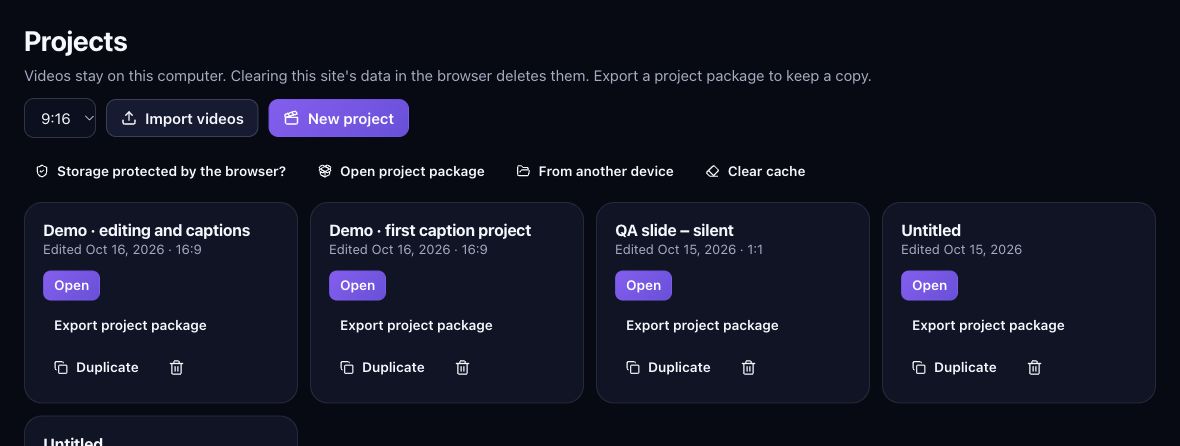
Finish the changes you want to keep, return to Projects, and use the project-package export action for that project. Wait for the file download and save it somewhere you can identify later. Keep the original recordings as a separate archive too.
- Confirm the source clips still play before exporting the package.
- Save the downloaded .promptfy file outside temporary browser storage.
- Include a recognizable project name and version in your archive naming.
Test the backup by reopening it
Use the package import action in Projects to reopen the downloaded file. Imported packages receive a separate project identity so they do not overwrite another draft’s media or history. Check the imported copy before treating the archive as usable.
Illustrative check: open a project with two clips, a title, and an added sound. Export the package, import it, and compare the beginning, the join, and the ending. Confirm that the sound plays and that the title remains in the intended place.
Understand what browser cleanup can remove
Browser storage holds working media and project data. Clearing site data, switching browser profiles, or using another computer can change what is locally available. A cloud project entry alone is not a complete media backup.
Derived caches and original media are also different. Temporary preview or proxy files may be recreated from available originals, but deleting a required original is not the same kind of cleanup. Confirm a tested package before removing any source you still need.
Keep a sharing copy and an editing copy
Save the final MP4 for viewers and the project package for future edits. Label the version so that a later correction does not get confused with the file already published. Reopen the archive after major changes if the editable copy matters to your workflow.
Package import requires a supported format, and future project versions may need a newer editor. This guide covers web package backup; do not assume every package can open in the native iPhone app or another vendor’s editor.
Frequently asked questions
Is my account a backup of all source videos?
Do not assume so. Project-document synchronization does not by itself guarantee that every local media file is uploaded or available on another device.
Can I keep only the MP4?
Keep only the MP4 if you need playback alone. Save a portable project package as well when you need the editable timeline and its media.
Can I clear browser data after downloading a package?
First import and verify the package, and keep an independent copy of important originals. A completed download alone does not establish that every needed part reopens correctly.

Try your next workflow in PromptFy Web
Open the browser app to check the tools and access available to your account.
Organize, trim, edit, and export recorded videosOpen PromptFy Web