
PromptFy Web
Edit captions with a live preview in your browser
Edit video captions online in PromptFy Web. Correct phrases, compare word effects, check contrast, and review a short export with the live preview.
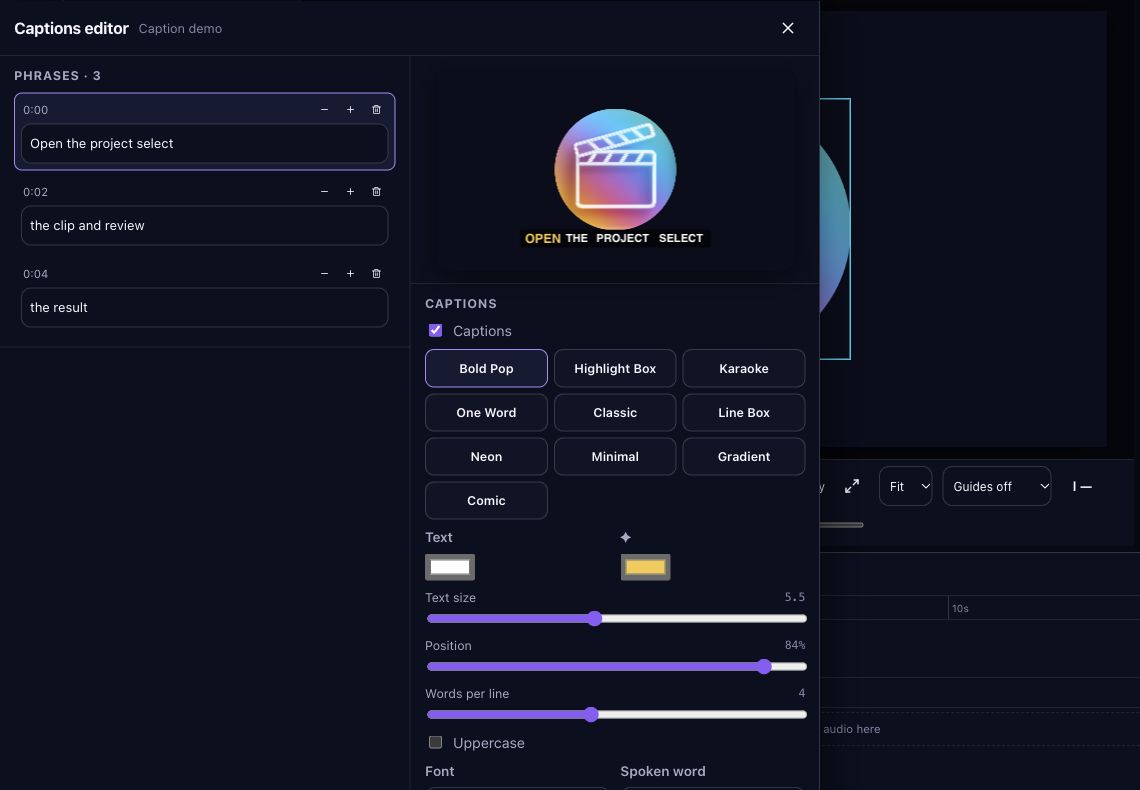
Get the words right before styling
Start with a clip that has a transcript. Generating a transcript may require internet access, account access, and AI credits; check the app before sending media. The caption editor needs recognized words to offer phrase editing.
Read the transcript while listening. Correct names, specialized terms, and punctuation that changes meaning. Automatic transcription is a starting point, so do not assume an attractive caption style makes the words accurate.
Keep phrases and the preview visible
Open the caption editor for the selected clip. The phrase list and style controls sit alongside a dedicated caption preview, and the editor leaves the video preview visible. This helps you compare wording and appearance without repeatedly closing the panel.
- Fix one phrase, then listen to that passage again.
- Check a long phrase and a short phrase before applying your preferred size.
- Keep captions clear of faces, product details, and likely interface overlays.
Compare word effects with a purpose
Try a restrained highlight before stronger effects such as karaoke, reveal, typewriter, or one-word display. Choose based on readability during speech rather than the most animated still image. A rapidly changing effect can make a technical explanation harder to follow.
Adjust the font and background opacity against both light and dark shots. Phrase transitions, including cut or fade, change how one phrase gives way to the next. Check the transition at a real speaking pace and watch for distracting flashes.
Use this caption review exercise
Illustrative phrase: “Open the project, select the clip, and review the result.” Compare a simple highlight with a one-word effect. Ask whether a viewer can follow the instruction without losing the action shown behind the words.
Then test a phrase containing a name and a number. Correct the text first, inspect the timing, and replay the join into the next phrase. The exercise is a manual quality check rather than a claim about engagement or watch time.
Verify the final file
Export a short passage containing the longest caption and at least one transition. Download the MP4, play it outside the editor, and check spelling, timing, contrast, and placement at the size your audience will use.
Browser support, source media, and plan access can affect generation and export. If you also create on iPhone, use the iPhone caption guide for that interface; browser instructions are specific to the web editor.
Frequently asked questions
Does styling fix transcription errors?
No. Correct recognized words separately, then check the style and timing. Always listen to names and numbers before exporting.
Can I compare captions without closing the editor?
The caption editor includes a dedicated preview beside its controls while leaving the video preview visible. Also play the passage in context.
Should every word have an animated effect?
That depends on the material. Compare a simple style with a stronger effect and keep the one that makes the words easier to follow.

Try your next workflow in PromptFy Web
Open the browser app to check the tools and access available to your account.
Generate and style automatic video subtitlesOpen PromptFy Web